
Most organizations that move to the cloud do so expecting to save money. However, many end up spending more than anticipated, often without a clear explanation of why. The causes tend to be structural rather than accidental: patterns in how cloud services are procured, deployed, and managed that create waste at every layer.
6 Reasons your cloud costs are higher than they should be

How to collect customer data securely (and why it matters more than ever)
Customer data is the engine behind better products, sharper marketing, and stronger business decisions. But how a business collects and protects that data has become as important as the data itself. Privacy regulations are tightening, customers are paying closer attention, and the consequences of getting it wrong have never been more significant.
5 Android features hiding in plain sight that are worth enabling

Android phones ship with a lot of features that most people never discover. Some are tucked into settings menus, some are disabled by default, and some have been available for years without ever getting the attention they deserve.
Switching from PC to Mac? Here’s how Windows Migration Assistant makes it easy
Moving from a Windows PC to a Mac involves more than getting used to a new operating system. It also means bringing your files, applications, contacts, and account settings along with you. To make that process as seamless as possible, Apple created Windows Migration Assistant, a purpose-built tool that handles the heavy lifting, so you don’t have to move files one by one or rebuild your settings from scratch.
Identifying and resolving phone infrastructure breaches

Unexpected spikes in network traffic or international charges usually indicate that bad actors are exploiting your communication tools. Knowing what to watch out for and how to respond enables your IT team to isolate threats and restore reliable voice services quickly.
Windows 11’s July 2026 update: What’s new and why it matters
Microsoft’s monthly Windows 11 updates are typically straightforward: you install them and move on. However, the July 2026 Security Update, which began rolling out on July 14 for Windows 11 versions 24H2 and 25H2, is worth a closer look.
Web hosting explained: How to choose the right plan for your business
Every business website needs somewhere to live. Web hosting is the infrastructure that makes that possible — the servers, storage, and software that keep your site accessible around the clock. Choosing the wrong type of hosting doesn’t just cost money; it can slow your site down, limit your ability to grow, and leave you scrambling when traffic spikes.
The health tech trends shaping care delivery in 2026

Health technology is entering a more practical phase. From virtual care and administrative AI to interoperability and data analytics, the focus is shifting from experimentation to full deployment. Here are the top trends reshaping the healthcare landscape in 2026.
Virtual care moves into routine care delivery
Virtual care involves the use of technology to provide healthcare services remotely.
Fileless malware: The threat your antivirus can’t always see

Most cybersecurity tools are built around a simple assumption: malicious software leaves files behind. Fileless malware is designed specifically to defeat that assumption. Rather than dropping a suspicious executable onto a hard drive, it operates entirely in memory, using your system’s own trusted tools against you, and leaving little to nothing for a traditional antivirus scanner to find.
Hard drives vs. solid-state drives: What every business owner should know
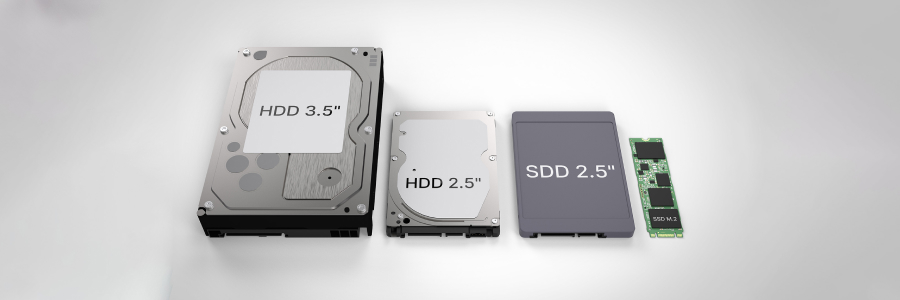
Corporate hardware decisions require balancing daily operating speeds against long-term data preservation requirements. Evaluating the fundamental mechanics of your storage hardware allows you to maximize office productivity while controlling budget expenses.
